Your Lecture Becomes a Dialogue
Quizzes, word clouds, flashcards, group assignments, timers: With the Campus App, you can engage your students in real time in the lecture hall—launched directly from your class.
The Campus App is developed at the Center for Teaching and Learning at the Technical University of Applied Sciences Augsburg. Its mission is to provide digital support for teaching right where it takes place: in the lecture hall. You control the activities on your laptop, and your students respond on their smartphones.
New: "Campus App for Teaching" Booklet

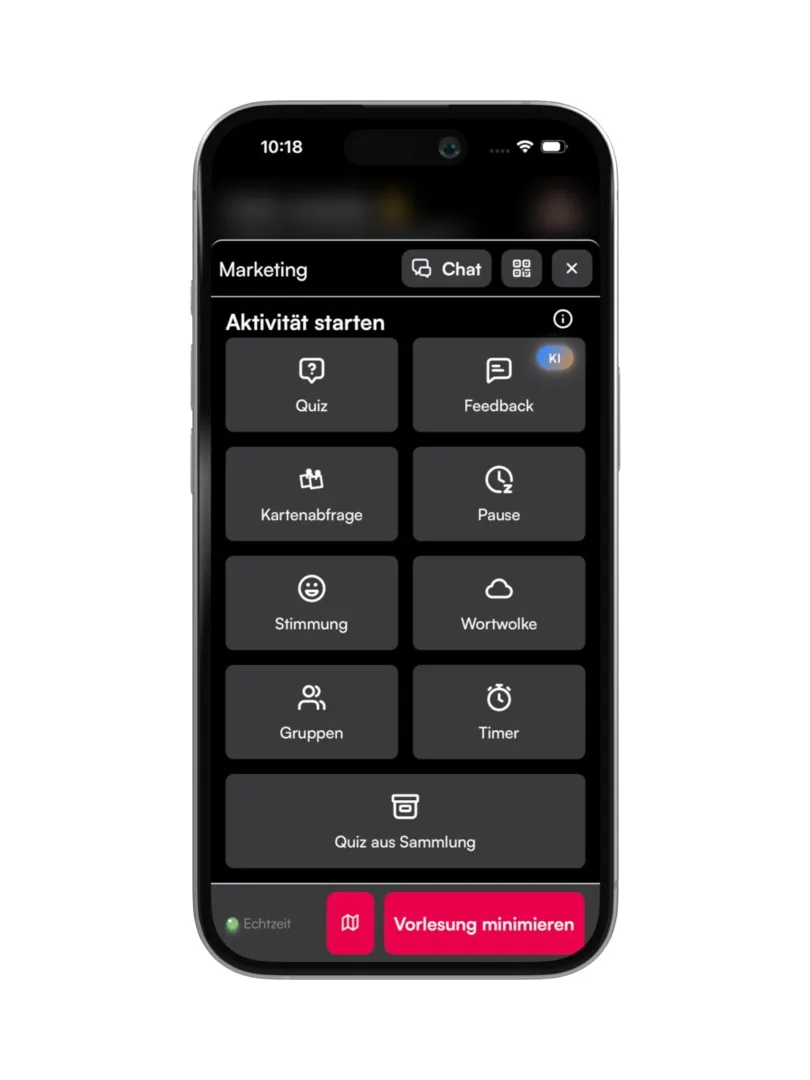
Here's How an Interactive Lecture Works
You create your course once in the app and share it with your students. After that, it takes just a few seconds to start an activity.
- Create a course and add it to your schedule.
- Share and join—your students join the course in their app.
- Start an activity—all features are available in a single menu.
- Display results—in full-screen mode for projectors and lecture hall screens.
Controls work the same on a laptop as on a smartphone. Your students respond on their own devices, and the results appear immediately.
Ten Activities—From the Very First Minute to Feedback
You can launch all activities directly from the current class session without switching apps. The following sequence follows the flow of a typical session—you can combine the features in any way you like.
Mood Barometer
To get things started: a quick snapshot of the mood using emojis.
- A quick overview of the atmosphere in the lecture hall
- Assessment of content, workload, or assignment
- Results shown as absolute numbers or percentages; full-screen view available for everyone upon request

Word Cloud
Make prior knowledge and expectations visible.
- Collect students’ free-response answers and present them clearly
- Frequently mentioned terms are visually highlighted
- Suitable for collaborative brainstorming, prior knowledge, or open-ended introductory questions

Quiz
Real-time knowledge check—also available as peer instruction.
- Select pre-made question types or create custom quizzes
- Include images or LaTeX formulas in questions and answers
- Display results as absolute scores or percentages; share solutions and statistics

Quiz Collection
Once created, they can be reused every semester.
- Permanently save quizzes as templates and reuse them
- Create collections and subcollections, assign tags, and share them with the faculty
- Access prepared quizzes directly from a collection during class

Map Query
Collect, weigh, and organize topics.
- Collect topics, questions, or suggestions from students
- Students can “like” each other’s cards
- Mark cards with labels: “later,” “important,” “discussed,” and “unclear”

Grouping
Form teams in seconds—randomly or by choice.
- Set the number of groups or the number of members
- The “Ready” and “Help” buttons provide feedback from the groups
- For project and presentation groups, random partner work, or even distribution of topics

Timer
Make the time visible instead of announcing it.
- Time limits for assignments, discussions, Think-Pair-Share, or presentations
- In full-screen mode for everyone in the lecture hall
- Also visible to students in their own app

Break
Plan breaks and communicate them reliably.
- Plan a break and notify all participants
- Display for everyone in the lecture hall in full-screen mode
- Remaining time visible to students in their own app
- The break time remains visible even afterward

Chat
The feedback channel that doesn't interrupt the lecture.
- Enable chat for the lecture and moderate it if desired
- Messages from the instructor to everyone; messages from students—including anonymous ones—to everyone or only to the instructor
- For questions during the lecture, sharing links, or short assignments

Feedback with AI
In conclusion: anonymous free-text feedback, automatically summarized.
- Collect anonymous free-text feedback from students
- Automatic summarization of the results by the Campus App’s AI
- Summary available in three, five, or seven points
- Data protection-compliant via servers at the Technical University of Applied Sciences Augsburg

The Students' Perspective
While you manage the activities on your laptop and display the results in full screen, everything else takes place on your students' smartphones. These screenshots show what they see—from quiz questions to group assignments.


Questions, requests, ideas?
The Campus App is continuously being developed at the Center for Teaching and Learning. If you notice a missing feature, something isn’t working as expected, or you have an idea for your teaching, we welcome all feedback and would be happy to work with you to try something out.
Email us at app(at)tha.de